> ## Documentation Index
> Fetch the complete documentation index at: https://docs.cantae.app/llms.txt
> Use this file to discover all available pages before exploring further.
# Introduction to Webapp
Cantaê web app allows you to have an interactive and fun experience directly from your smartphone, tablet, or any device with browser. With it, you can select your favorite songs and add them to the queue, control the vocal or playback volume, view synchronized lyrics in real-time, and even send emoji reactions to the karaoke screen. All of this is designed to make your karaoke sessions even more lively and engaging!
Please note: Our web app may not function correctly on the Safari browser. For the best experience, we recommend using a different browser with Chromium-based Support.
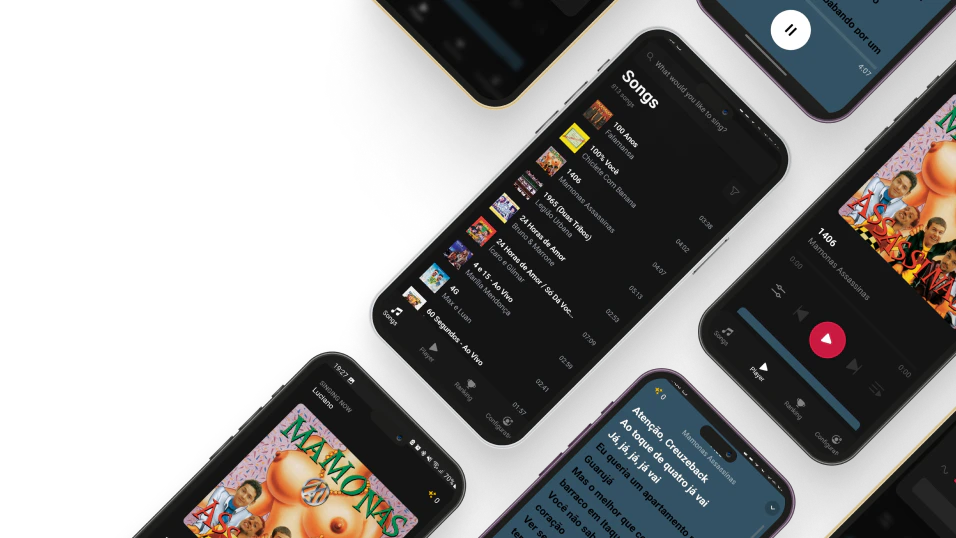 The app is divided into four tabs: Songs, Player, Ranking, and Settings:
It is possible to search and sort songs by title or artist. Add songs to the queue with just one hand.
The player shows the song's information like duration, lyrics, and volume control. You can also send emoji reactions to the karaoke screen.
The ranking of the best singers in the Webapp.
Configure the app according to your preferences, such as the singer name, language and color theme.
The app is divided into four tabs: Songs, Player, Ranking, and Settings:
It is possible to search and sort songs by title or artist. Add songs to the queue with just one hand.
The player shows the song's information like duration, lyrics, and volume control. You can also send emoji reactions to the karaoke screen.
The ranking of the best singers in the Webapp.
Configure the app according to your preferences, such as the singer name, language and color theme.